

 Send Inquiry



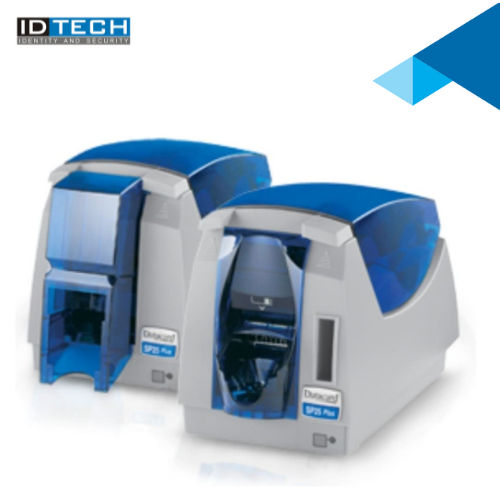
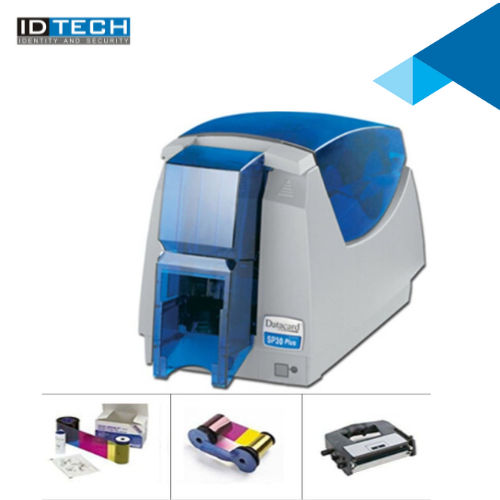

datacard printer sp30 seller
38000 INR/Piece
Product Details:
- Processor Type ARM-based
- Features Edge-to-edge printing, USB connectivity, easy-to-use driver software
- Print Speed Up to 120 full-color or 500 monochrome cards/hour
- Print Technology Dye Sublimation / Resin Thermal Transfer
- Humidity % 20% to 80% (non-condensing)
- Capacity 100-card input hopper
- Weight 4.5 kg
- Click to View more
X
datacard printer sp30 seller Price And Quantity
- 1 Number
- 38000 INR/Piece
- Direct to card
- Status indication
- Edge-to-edge
- Magnetic stripe encoding
- YMCKT, Monochrome
- LED buttons
- PVC, PET, Composite PVC
- 0.76 mm (30 mil)
- Desktop
- Kensington® Lock compatible
- 30 cards
- Single-sided printing
- Windows (XP/7/8/10/11)
- Datacard ID Works
datacard printer sp30 seller Product Specifications
- 15C to 30C
- USB 2.0
- New
- CR80 (Standard ID card size)
- 4.5 kg
- 100-card input hopper
- 20% to 80% (non-condensing)
- 500 cards/hour
- Id Card Printing
- Dye Sublimation / Resin Thermal Transfer
- Edge-to-edge printing, USB connectivity, easy-to-use driver software
- Up to 120 full-color or 500 monochrome cards/hour
- ARM-based
- 100-240 V AC, 50/60 Hz
- Government, Corporate, Education, Healthcare, Retail
- Internal Power Supply
- Automatic
- 300 dpi
- 157 mm(H) x 168 mm(W) x 343 mm(L)
- 120 cards/hour
- 320 MHz
- 50 W
- Single-Sided Direct-to-Card Printing
- ABS plastic
- <65 dB
- Plastic & Metal housing
- Direct to card
- Status indication
- Edge-to-edge
- Magnetic stripe encoding
- YMCKT, Monochrome
- LED buttons
- PVC, PET, Composite PVC
- 0.76 mm (30 mil)
- Desktop
- Kensington® Lock compatible
- 30 cards
- Single-sided printing
- Windows (XP/7/8/10/11)
- Datacard ID Works
datacard printer sp30 seller Trade Information
- Cheque
- 2 Week
- Australia, South America, Western Europe, Middle East, Central America, Asia, Eastern Europe, North America, Africa
- All India
Product Description
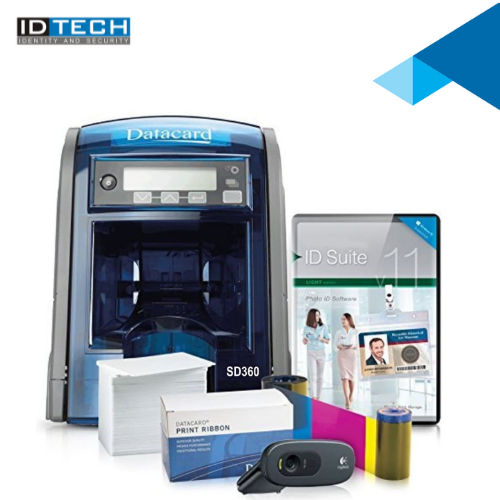
ID Tech Offers a sleek, compact design, Datacard SP30 Printer makes it easy to fit even in the smallest of office settings. Designed with efficiency in mind, the sp30 comes with built-in software, automatic printer health monitoring, diagnostic utility and an easy to install, all-in-one printer ribbon and card cleaning cartridge, making your in-house plastic ID card printing virtually worry-free.Reliable Single-Sided Printing Performance
The SP30 ensures consistent print quality for professional ID cards using single-sided, direct-to-card technology. Its dye sublimation and thermal transfer method creates detailed images and text, making it ideal for secure identification needs in a range of sectors including corporate offices, schools, and healthcare institutions.
Versatile Card Handling and Fast Throughput
With a 100-card input hopper and output tray for 30 cards, the SP30 manages bulk jobs with ease. It offers impressive print speeds: up to 120 full-color or 500 monochrome cards per hour, optimizing productivity without sacrificing quality. Compatible with PVC, PET, and composite PVC cards, it accommodates standard CR80 sizes.
Intuitive Operation and Enhanced Security
The integrated LED control panel and easy-to-use driver software simplify everyday use, even for new operators. Security features like Kensington Lock compatibility and optional magnetic stripe encoding provide peace of mind, ensuring confidential data protection and compliance with organizational protocols.
FAQ's of datacard printer sp30 seller:
Q: How does the Datacard SP30 printer connect to my computer?
A: This printer uses a USB 2.0 interface for straightforward connection to desktop computers. It supports Windows operating systems from XP through Windows 11, ensuring broad compatibility and seamless integration with your existing IT setup.Q: What types and thicknesses of cards can the SP30 accommodate?
A: The SP30 supports PVC, PET, and composite PVC cards with a thickness of 0.76 mm (30 mil). Its input hopper holds up to 100 cards, making it suitable for both everyday and bulk printing applications.Q: When is magnetic stripe encoding required for ID card printing?
A: Magnetic stripe encoding is an optional feature, typically needed when your cards must store data for security or access control systems, such as employee identification, student cards, or financial applications.Q: Where can the SP30 printer be used effectively?
A: The SP30 is designed for flexibility and can be deployed in government, corporate, education, healthcare, and retail environments. Its desktop installation and moderate noise level make it suitable for office or front-desk use.Q: What is the process for printing edge-to-edge ID cards with the SP30?
A: Using the Datacard ID Works software bundle, you design your cards and initiate printing. The SP30's direct-to-card print technology ensures vibrant, edge-to-edge prints on each card automatically, with easy monitoring via LED status indicators.Q: How does Kensington Lock compatibility benefit users?
A: Kensington Lock compatibility provides a secure way to physically lock the printer to a desk or workstation, reducing theft risk and safeguarding sensitive printing equipment in high-traffic or public areas.Q: What are the main benefits of using the SP30 printer for ID card issuance?
A: The SP30 offers high-quality edge-to-edge printing, fast output speeds, simple operation through LED buttons, robust security features, and compatibility with major card formats. These advantages streamline ID card production, improve security, and save time in busy organizational environments.Tell us about your requirement

Price:
Quantity
Select Unit
- 50
- 100
- 200
- 250
- 500
- 1000+
Additional detail
Mobile number
Email

Other Products in 'Card Printers' category




"We are accepting bulk order quantity only."
 Send Inquiry
 Send SMS
ID TECH SOLUTIONS PVT LTD
GST : 06AACCI5313D1Z4
GST : 06AACCI5313D1Z4

- Plot No. 610, Udyog Vihar, Phase V, Gurugram - 122016, Haryana, India
- Phone : 08045813073

- Mr Saurav Khemani (Managing Director)
- Mobile : 08045813073
- info@idsolutionsindia.com

|


ID TECH SOLUTIONS PVT. LTD.
All Rights Reserved.(Terms of Use)
Developed and Managed by Infocom Network Private Limited.
Developed and Managed by Infocom Network Private Limited.

