

 Send Inquiry



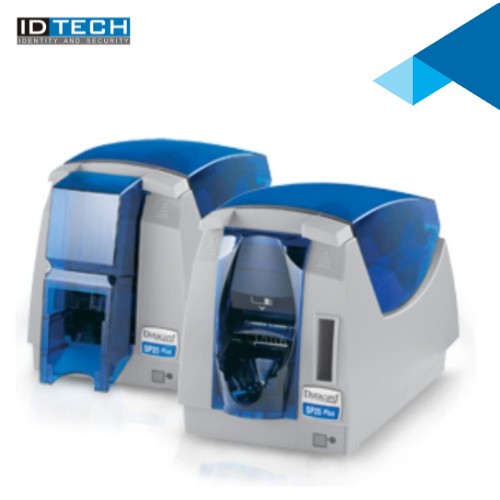
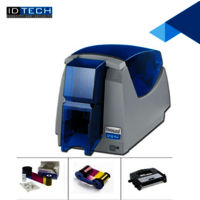

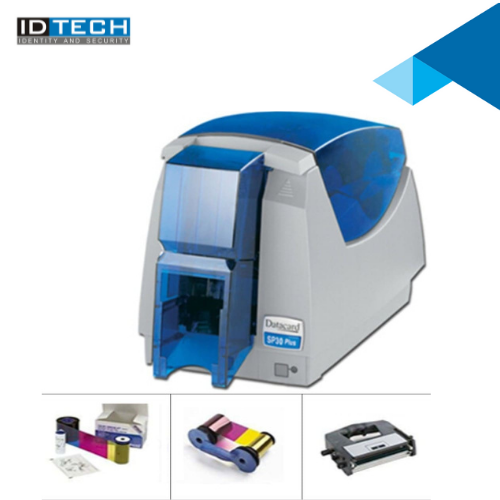
buy Datacard SP30 Printer
38000 INR/Piece
Product Details:
- Humidity % 20% - 80% non-condensing
- Interface USB 1.1, optional Ethernet
- Print Speed Up to 120 cards/hour in color, 500 cards/hour in monochrome
- Print Technology Dye-sublimation / Thermal transfer
- Features Edge-to-edge printing, Compact design, Secure system access, User-friendly interface
- Power Supply Integrated power supply
- Noise Level Less than 60 dB(A)
- Click to View more
X
buy Datacard SP30 Printer Price And Quantity
- 1 Number
- 38000 INR/Piece
- Windows 7, 8, 10 (and earlier versions with drivers)
- English and multi-language driver support
- Edge-to-edge on standard CR80 cards
- 40 cards
- YMCKT, YMCKT-KT, Monochrome ribbons
- 100 cards
- 0.254 mm to 1.016 mm
buy Datacard SP30 Printer Product Specifications
- 100-240V AC, 50/60 Hz
- Integrated power supply
- ID card printing
- Edge-to-edge printing, Compact design, Secure system access, User-friendly interface
- Dye-sublimation / Thermal transfer
- Up to 120 cards/hour in color, 500 cards/hour in monochrome
- 120 cards per hour (YMCKO)
- USB 1.1, optional Ethernet
- Automatic
- 20% - 80% non-condensing
- 300 dpi
- Single-side card printing
- Offices, Educational Institutions, Government, Healthcare, Corporate Badging
- 60F to 95F (15C to 35C)
- 3.7 kg
- New
- 337 mm x 172 mm x 206 mm
- Input hopper: 100 cards, Output hopper: 40 cards
- ABS Plastic
- 65W
- ABS Plastic
- Embedded microcontroller
- 500 cards per hour (monochrome)
- Less than 60 dB(A)
- CR-80 (85.6mm 53.98mm)
- Windows 7, 8, 10 (and earlier versions with drivers)
- English and multi-language driver support
- Edge-to-edge on standard CR80 cards
- 40 cards
- YMCKT, YMCKT-KT, Monochrome ribbons
- 100 cards
- 0.254 mm to 1.016 mm
buy Datacard SP30 Printer Trade Information
- Cheque
- 2 Week
- Australia, South America, Western Europe, Middle East, Africa, Central America, Asia, Eastern Europe, North America
- All India
Product Description
ID Tech Offers a sleek, compact design, Datacard SP30 Printer makes it easy to fit even in the smallest of office settings. Designed with efficiency in mind, the sp30 comes with built-in software, automatic printer health monitoring, diagnostic utility and an easy to install, all-in-one printer ribbon and card cleaning cartridge, making your in-house plastic ID card printing virtually worry-free.Versatile Card Printing for Every Industry
The Datacard SP30 Printer meets diverse card printing needs for offices, educational institutions, governments, healthcare, and corporates. Its edge-to-edge capability ensures professional ID badges and secure cards with crisp, clear detail. With compatibility for multiple operating systems and multi-language support, this model is engineered to integrate seamlessly into varied workflows.
Efficient Performance and User-Friendly Operation
Designed for productivity, the SP30 boasts quick print speeds (120 color cards/hour, 500 monochrome cards/hour) and high hopper capacity. The embedded microcontroller ensures smooth automated operation, while the secure system access and compact design make it easy to use in any workspace. A noise level under 60 dB(A) guarantees a comfortable printing environment.
FAQ's of buy Datacard SP30 Printer:
Q: How do I operate the Datacard SP30 Printer for ID card printing?
A: Simply load up to 100 cards in the input hopper, connect the printer via USB (or optional Ethernet), install the relevant drivers for Windows operating systems, and select your ribbon type (YMCKT, YMCKT-KT, or monochrome). The user-friendly interface guides you through print settings for single-side edge-to-edge card production.Q: What types of ribbons and cards are supported by the Datacard SP30?
A: The printer supports YMCKT, YMCKT-KT, and monochrome ribbons and is optimized for standard CR80 cards with a thickness range of 0.254 mm to 1.016 mm, suitable for most professional ID and access cards.Q: Where can the Datacard SP30 Printer be used effectively?
A: This printer suits a range of environments, including offices, schools, hospitals, government departments, and corporate establishments. Its compact build and automatic features allow for convenient integration on desks, reception areas, or secure locations where ID card issuance is required.Q: What is the typical card printing process with the SP30 Printer?
A: After installation, load your cards and ribbon, customize your design in compatible Windows software, and print directly using the automatic hopper and output system. The printer's embedded controller handles operations efficiently, making card issuance streamlined and reliable.Q: When is it beneficial to use the SP30 for monochrome versus color printing?
A: Choose monochrome ribbons for simple, high-volume card printing, such as barcode or text-only badges, achieving speeds up to 500 cards per hour. Opt for full-color (YMCKO) ribbons when branding, photo, or visually-rich identification is required, yielding up to 120 cards per hour with vivid quality.Q: What advantages does the Datacard SP30 offer over standard printers?
A: SP30 provides edge-to-edge printing, secure system access, multi-language driver support, and a compact design. Its efficient hopper and high-resolution output elevate productivity and print quality for organizations needing fast, professional card issuance.Tell us about your requirement

Price:
Quantity
Select Unit
- 50
- 100
- 200
- 250
- 500
- 1000+
Additional detail
Mobile number
Email

Other Products in 'Card Printers' category

"We are accepting bulk order quantity only."
 Send Inquiry
 Send SMS
 Call Me Free
ID TECH SOLUTIONS PVT LTD
GST : 06AACCI5313D1Z4
GST : 06AACCI5313D1Z4

- Plot No. 610, Udyog Vihar, Phase V, Gurugram - 122016, Haryana, India
- Phone : 08045813073

- Mr Saurav Khemani (Managing Director)
- Mobile : 08045813073
- info@idsolutionsindia.com

|


ID TECH SOLUTIONS PVT. LTD.
All Rights Reserved.(Terms of Use)
Developed and Managed by Infocom Network Private Limited.
Developed and Managed by Infocom Network Private Limited.

