

 Send Inquiry



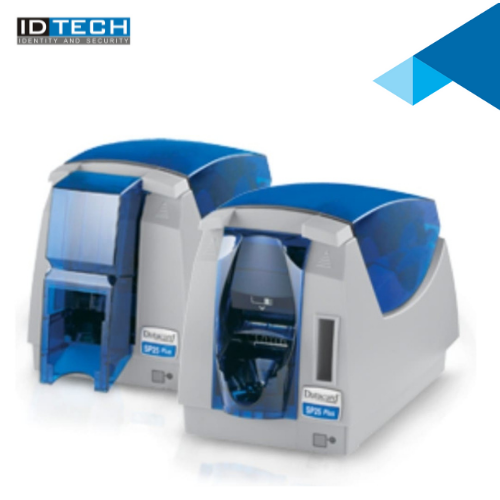
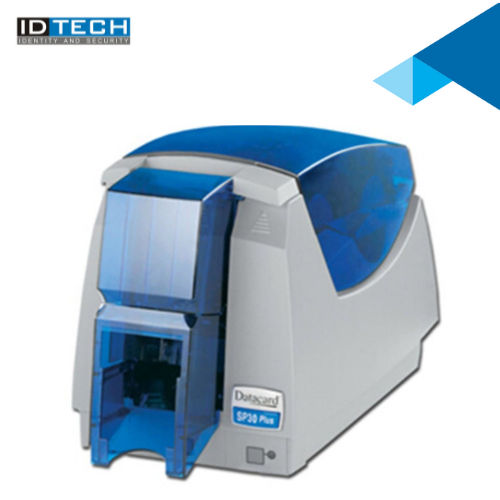

Datacard SP30 Printer
38000 INR/Piece
Product Details:
- Noise Level Less than 65 dB
- Print Speed Up to 120 full-color cards/hour, up to 500 monochrome cards/hour
- Working Temperature 15C to 35C
- Features Edge-to-edge printing, Compact Size, Reliable Operation
- Humidity % 20% to 80% (non-condensing)
- Weight Approx. 4.5 kg
- Cabinet Material Durable ABS
- Click to View more
X
Datacard SP30 Printer Price And Quantity
- 1 Number
- 38000 INR/Piece
- YMCKT, Monochrome ribbons
- PVC, PET, Composite Cards
- Up to 85.6 x 53.98 mm
- 0.25 mm to 1.016 mm
- Yes, downloadable from Datacard
- Automatic
- Windows 2000, XP, Vista, 7
- Optional Magnetic Stripe, Smart Card Coding
- LED status indicator
Datacard SP30 Printer Product Specifications
- 50W
- USB 1.1, Optional Ethernet
- Input Hopper: 100 cards, Output Hopper: 40 cards
- Monochrome: Up to 500 cards/hour
- New
- CR-80 (53.98 x 85.6 mm)
- Approx. 4.5 kg
- Durable ABS
- Single-sided Card Printing
- Direct-to-card dye-sublimation/resin thermal transfer
- 20% to 80% (non-condensing)
- 100-240V AC, 50/60Hz
- 300 dpi
- Less than 65 dB
- Up to 120 full-color cards/hour, up to 500 monochrome cards/hour
- 15C to 35C
- Edge-to-edge printing, Compact Size, Reliable Operation
- ID Card Printing
- Employee ID, Membership Card, Visitor Badge Printing
- Full-color: Up to 120 cards/hour
- Plastic and Metal
- Automatic
- Integrated Suitable for Card Print Processing
- 381 x 178 x 229 mm (L x W x H)
- Integrated Controller
- External power adapter
- YMCKT, Monochrome ribbons
- PVC, PET, Composite Cards
- Up to 85.6 x 53.98 mm
- 0.25 mm to 1.016 mm
- Yes, downloadable from Datacard
- Automatic
- Windows 2000, XP, Vista, 7
- Optional Magnetic Stripe, Smart Card Coding
- LED status indicator
Datacard SP30 Printer Trade Information
- Cheque
- 2 Week
- Australia, South America, Eastern Europe, Western Europe, Middle East, Central America, Asia, North America, Africa
- All India
Product Description
ID Tech Offers a sleek, compact design, Datacard SP30 Printer makes it easy to fit even in the smallest of office settings. Designed with efficiency in mind, the sp30 comes with built-in software, automatic printer health monitoring, diagnostic utility and an easy to install, all-in-one printer ribbon and card cleaning cartridge, making your in-house plastic ID card printing virtually worry-free.Versatile Ribbon Compatibility
The SP30 printer supports both full-color YMCKT and monochrome ribbons, enabling users to choose between vivid color card printing or fast, high-volume black-and-white production. This flexibility makes it ideal for varied card applications, from staff IDs to visitor badges.
Efficient, Reliable Operation
Reliable operation is ensured with automatic card feeding, durable materials, and a compact footprint. Edge-to-edge printing, low noise (under 65 dB), and a quick processor guarantee seamless performance, making this printer suitable for busy environments.
Security and Connectivity Options
Optional magnetic stripe and smart card encoding features allow enhanced security for sensitive applications. The printer offers USB 1.1 as standard and Ethernet as an option, with downloadable drivers for easy setup across workplaces of all sizes.
FAQ's of Datacard SP30 Printer:
Q: How can I install the Datacard SP30 Printer on my computer?
A: To install the Datacard SP30 Printer, download the appropriate driver from Datacard's official website. The printer is compatible with Windows 2000, XP, Vista, and 7. Follow the on-screen prompts after connecting the device via USB or optional Ethernet.Q: What types of cards can the SP30 printer handle?
A: The SP30 printer supports PVC, PET, and composite cards with thickness ranging from 0.25 mm to 1.016 mm. It prints on CR-80 sized cards (85.6 x 53.98 mm), commonly used for employee IDs, membership cards, and visitor badges.Q: When is it beneficial to use monochrome ribbons instead of color?
A: Monochrome ribbons are best for high-volume applications requiring text or simple graphics, as they offer faster speeds (up to 500 cards/hour) and lower costs. They're ideal when color is not essential, such as basic ID or membership cards.Q: Where can users find support and drivers for the SP30 printer?
A: Support materials and printer drivers can be downloaded directly from Datacard's official website. This ensures easy setup and troubleshooting for businesses in India and beyond.Q: What process does the SP30 use for printing cards?
A: The Datacard SP30 employs direct-to-card dye-sublimation and resin thermal transfer print technology, enabling edge-to-edge, durable prints with a maximum resolution of 300 dpi.Q: How does automatic card feeding benefit the printing process?
A: Automatic card feeding allows efficient batch printing, minimizing manual intervention. The input hopper holds up to 100 cards, and the output hopper accommodates 40 finished cards, streamlining processes in workplaces with frequent card issuance.Q: What are the security features available on the SP30?
A: Security options include magnetic stripe encoding and smart card coding, which can be added for organizations requiring additional card protection or data storage, such as financial institutions or workplaces with restricted access areas.Tell us about your requirement

Price:
Quantity
Select Unit
- 50
- 100
- 200
- 250
- 500
- 1000+
Additional detail
Mobile number
Email

Other Products in 'Card Printers' category


"We are accepting bulk order quantity only."
 Send Inquiry
 Send SMS
 Call Me Free
ID TECH SOLUTIONS PVT LTD
GST : 06AACCI5313D1Z4
GST : 06AACCI5313D1Z4

- Plot No. 610, Udyog Vihar, Phase V, Gurugram - 122016, Haryana, India
- Phone : 08045813073

- Mr Saurav Khemani (Managing Director)
- Mobile : 08045813073
- info@idsolutionsindia.com

|


ID TECH SOLUTIONS PVT. LTD.
All Rights Reserved.(Terms of Use)
Developed and Managed by Infocom Network Private Limited.
Developed and Managed by Infocom Network Private Limited.

